GERP ODOO Course
Completed
Visible menus and bar icons
Besides each person's permissions, the administrator decides which menus exist for everyone and which icons the top bar carries.
Visible menus
In Misc › Visible menus (or Settings › GERP ODOO):
- Turn off what the business does not use: it disappears from the top menu for everyone, including the administrator. It can be turned back on whenever you want.
- With the arrows you change the order of the sections in the bar.
- With the dropdown you choose how they look: Icon only if it does not fit, Always with text or Always icon only.
- Save applies it.
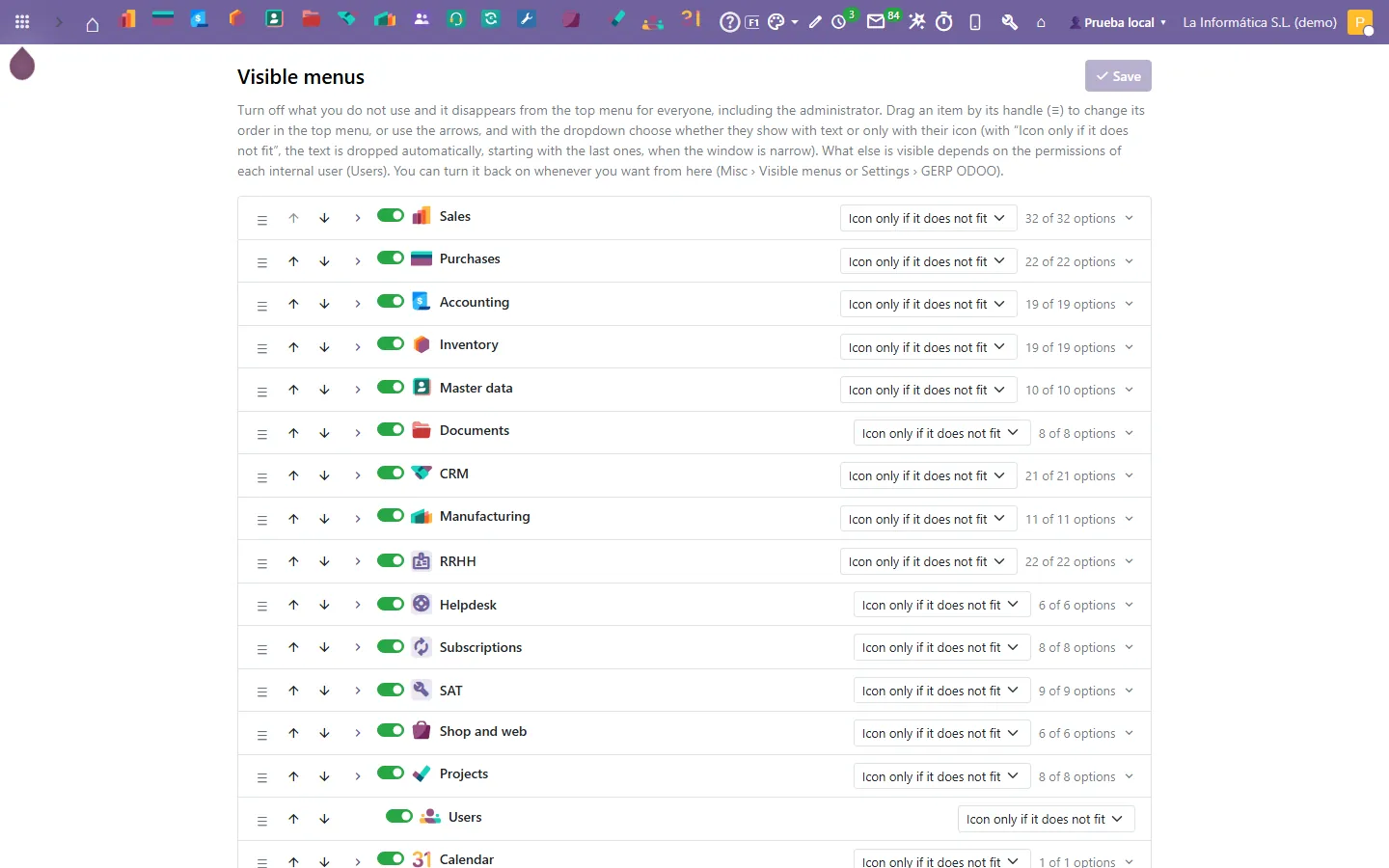
They are two different things: Visible menus decides what is available for the whole business; Internal users decides, out of that, what each person sees.
The icons in the top bar
Each icon is a permission in the «Top bar icons» section of Internal users, and in Visible menus it can be hidden for everyone:
- Botón de aplicaciones (los 9 puntos)
- Studio (la llave)
- Mobile view (the circle)
- Conversations (messages)
- Pending activities (the clock)
- Calls
- Hours timer
- AI assistant (Ask me)
- Solicitudes de firma (el lápiz)
- Preferencias del menú de aplicaciones (la paleta)
Rating
0
0
There are no comments for now.
Join this Course
to be the first to leave a comment.